
- Internet, Networking & Cyber Security(इन्टरनेट, नेटवर्किंग एवं साइबर सिक्योरिटी)
- 7.3 Types of Network (नेटवर्क के प्रकार)
- 7.3.3 Wide Area network (WAN) (वाइड एरिया नेटवर्क (वैन))
- 7.4 Difference between LAN, MAN and WAN (लैन, मैन तथा वैन में अन्तर)
- 7.5. Network devices or networking hardware (नेटवर्क डिवाइसेस या हार्डवेयर)
- 7.6 Network Media (Transmission Media) (नेटवर्क मीडिया (ट्रांसमिशन मीडिया))
- 7.7 Network Topology (नेटवर्क टोपोलॉजी)
- 7.8 OSI Model, TCP/IP Model and Network Protocol
- 7.9.1 Internet (इंटरनेट)
- 7.9.2 What is the World Wide Web (WWW)? (वर्ल्ड वाइड वेब क्या है?)
- 7.10 Web Address (वेब एड्रेस)
- 7.11 IP Address (आईपी० एड्रेस)
- 7.13 Internet Access Technology (इंटरनेट एक्सेस टेक्नोलॉजी)
- 7.14 Search Engines and Popular Search Engines (सर्च इंजन एवं लोकप्रिय सर्च इंजन)
- 7.16 Cyber Crime (साइबर अपराध)
- 7.17 Malwares and Malware Types (मॉलवेयर और मॉलवेयर के प्रकार)
World Wide Web is also called the Web and it was invented by Tim Berners-Lee in 1989. The WWW is a collection of Internet sites that can be accessed by using a hypertext interface. Hypertext documents on the web contain links to other documents located anywhere on the web. By clicking on a link, you are immediately taken to another file or site to access relevant materials. The interesting thing about Hypertext links is that the links might take you to related material on another computer located anywhere in the world, rather than just to a file on your local hard drive.
वर्ल्ड वाइड वेब को वेब भी कहा जाता है और इसका आविष्कार टिम बर्नर्स-ली ने 1989 में किया था। डब्ल्यूडब्ल्यूडब्ल्यू इंटरनेट साइटों का एक संग्रह है जिसे हाइपरटेक्स्ट इंटरफेस का उपयोग करके एक्सेस किया जा सकता है। वेब पर हाइपरटेक्स्ट डॉक्युमेंट्स के कहीं भी स्थित अन्य डॉक्युमेंट्स के लिंक होते हैं। एक लिंक पर क्लिक करके, आपको प्रासंगिक सामग्रियों तक पहुंचने के लिए तुरंत किसी अन्य फाइल या साइट पर ले जाया जाता है। हाइपरटेक्स्ट लिंक के बारे में दिलचस्प बात यह है कि लिंक आपको दुनिया में कहीं भी स्थित किसी अन्य कंप्यूटर पर संबंधित सामग्री पर ले जा सकते हैं, बजाय आपके स्थानीय हार्ड ड्राइव पर एक फाइल के।
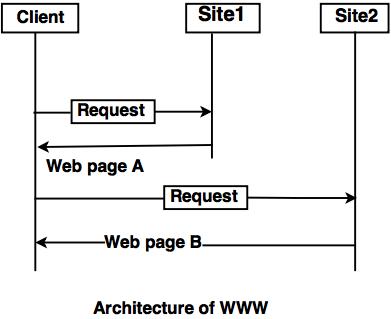
In the above www architecture,
- The client wants to see some information that belongs to site 1.
- It sends a request through its browser to the server at site 2.
- The server at site 1 finds the document and sends it to the client.
7.9.2.1 Some terms used in WWW (WWW में उपयोग होने वाले कुछ टर्म्स)
- Browser: A WWW or web browser is software on your computer that allows you to access the World Wide Web. Examples include Netscape Navigator, Google Chrome and Microsoft Internet Explorer. ब्राउज़र: आपके कंप्यूटर पर एक WWW या वेब ब्राउज़र सॉफ़्टवेयर है जो आपको वर्ल्ड वाइड वेब का उपयोग करने की अनुमति देता है। उदाहरणों में नेटस्केप नेविगेटर, Google क्रोम और Microsoft इंटरनेट एक्सप्लोरर शामिल हैं।
- Hypertext: Hypertext is text that contains electronic links to other text. In other words, if you click on hypertext it will take you to other related material. हाइपरटेक्स्ट: हाइपरटेक्स्ट वह टेक्स्ट होता है जिसमें अन्य टेक्स्ट के इलेक्ट्रॉनिक लिंक होते हैं। दूसरे शब्दों में, यदि आप हाइपरटेक्स्ट पर क्लिक करते हैं तो यह आपको अन्य संबंधित सामग्री तक ले जाएगा।
- HTML (Hypertext Markup Language): HTML is a set of commands used to create World Wide Web documents. The commands allow the document creator to define the parts of the document. For example, you may have text marked as headings, paragraphs, bulleted text, footers, etc. HTML (हाइपरटेक्स्ट मार्कअप लैंग्वेज): HTML वर्ल्ड वाइड वेब डॉक्यूमेंट्स बनाने के लिए इस्तेमाल किया जाने वाला कमांड का एक सेट है। ये कमांड, दस्तावेज़ निर्माता को दस्तावेज़ के कुछ हिस्सों को परिभाषित करने की अनुमति देता है। उदाहरण के लिए, आपके पास शीर्षक, पैराग्राफ, बुलेटेड टेक्स्ट, फूटर आदि के रूप में चिह्नित टेक्स्ट हो सकते हैं।
- URL (Uniform Resource Locator): Links between documents are achieved by using an addressing scheme. That is, in order to link to another document or item (sound, picture, movie), it must have an address. URL (यूनिफ़ॉर्म रिसोर्स लोकेटर): एड्रेसिंग स्कीम का उपयोग करके दस्तावेज़ों के बीच लिंक प्राप्त किए जाते हैं। यानी किसी दूसरे डॉक्युमेंट या आइटम (साउंड, पिक्चर, मूवी) से लिंक करने के लिए उसका एड्रेस होना चाहिए। उस पते को उसका URL कहा जाता है।
- Home Page: It is the starting page of any website. होम पेज: यह एक वेब साइट का शुरुआती पेज होता है।
- Client and Server: If a computer has a web browser installed, it is known as a client. A host computer that is capable of providing information to others is called a server. A server requires special software in order to provide web documents to others. क्लाइंट और सर्वर: यदि किसी कंप्यूटर में एक वेब ब्राउज़र स्थापित है, तो उसे क्लाइंट के रूप में जाना जाता है। एक होस्ट कंप्यूटर जो दूसरों को जानकारी प्रदान करने में सक्षम है उसे सर्वर कहा जाता है। दूसरों को वेब डॉक्यूमेंट प्रदान करने के लिए एक सर्वर को विशेष सॉफ्टवेयर की आवश्यकता होती है।


