
- Introduction Of MS Excel – 2016
- 4.2 Elements of Spread Sheet (स्प्रेडशीट के तत्व)
- 4.3 Creating of Spread Sheet (स्प्रेडशीट तैयार करना)
- 4.4 Opening an Existing Workbook (मौजूदा वर्कबुक को खोलना)
- 4.6 Page Setup (पेज सेटअप)
- 4.7 Printing a Worksheet (वर्कशीट को प्रिन्ट करना)
- 4.9 Entering, Editing, and Formatting Data (इन्टरिंग, एडिटिंग और फॉर्मेटिंग डाटा)
- 4.9.2 Editing Data (एडिटिंग डाटा)
- 4.9.3 Formatting Data in an Excel spreadsheet (एक्सेल स्प्रेडशीट मे डाटा फॉर्मेट करना)
- 4.9.3.2 Changing Font, Size and Style (फ़ॉन्ट, साइज एवं स्टाईल में बदलाव)
- 4.9.3.3 Changing the Alignment of the data in the cell (सेल में डेटा का अलाइनमेंट बदलना)
- 4.9.3.5 Wrap text in a cell (सेल में टेक्स्ट रैप करें)
- 4.10 Modifying columns, Rows and cell (रो, कॉलम या सेल को बदलना)
- 4.11 Inserting, Deleting, Moving and Hiding Rows, Column(इंसर्टिंग, डिलीटिंग, मूविंग और हाइडिंग रो, कॉलम)
- 4.11.2 Moving rows and columns (रो एवं कॉलम को मूव करना)
- 4.11.3 Hiding/ UnHiding Rows and Column
- 4.12 AutoFill (ऑटोफिल)
- 4.13 Sorting & Filtering (शॉर्टिंग एवं फिल्टरिंग)
- 4.13.2 Filtering Data (फ़िल्टरिंग डेटा)
- 4.14 Pivot Tables and Pivot Chart (पॉयोट टेबिल्स और पॉयोट चार्ट)
- 4.15 Cell Reference (सेल रेफरेंस)
- 4.16.2 Absolute cell Reference (एब्सॉल्यूट सेल रेफरेंस)
- 4.17 Formulas, Functions and Charts (फॉर्मूला, फंक्शन एवं चार्ट्स)
- 4.17.2 Charts (चार्ट)
- 4.18 Data Validation (डेटा वैलिडेशन)
- 4.19 Freezing panes (फ़्रीज़िंग पेन्स)
- 4.20 Macros (मैक्रो)
- 4.21 Shortcut keys
By default, every row and column of a new workbook is set to the same height and width. Excel allows you to modify column width and row height in different ways. A cell is built using row and column where row is the height and column is the width of the cell. We can change or fix the height and width of a cell in the worksheet.
डिफ़ॉल्ट रूप से, नई वर्कबुक की प्रत्येक रो और कॉलम समान हाईट और विड्थ पर सेट होते हैं। एक्सेल आपको कॉलम विड्थ और रो की हाईट को अलग-अलग तरीकों से संशोधित करने की अनुमति देता है। रो और कॉलम का उपयोग कर एक सेल बनाया जाता है जहाँ रो हाईट होती है और कॉलम सेल की विड्थ होती है। वर्कशीट में किसी सेल की हाईट, रो की हाईट पर तथा सेल की विड्थ, कॉलम की विड्थ पर निर्भर करती है। हम वर्कशीट में सेल की हाईट और कॉलम विड्थ को बदल या फिक्स्ड कर सकते हैं।
Steps for changing the Row height/Column width (रो की हाईट/कॉलम विड्थ को बदलने के स्टेप्स):
- Select the Row/Column which you want to change.
- Go to Home tab -> Click the Format tool -> Select Row Height/Column Width command from the Format drop-down menu, as shown in the figure. A dialog will ask the height/width; Mention the value of row height/column width and click OK.
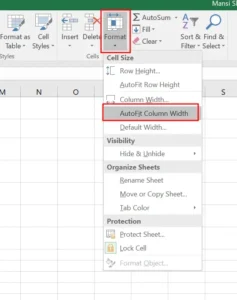
उस रोल/कॉलम को सेलेक्ट करें जिसे आप बदलना चाहते है, फिर होम टैब पर जाये फॉर्मेट टूल पर क्लिक करें जैसा फीगर मे दिखाया गया है फिर ड्रॉप डाउन मेनू से रो हाईट/कॉलम विड्थ को सेलेक्ट करें। एक डायलॉग बॉक्स रो हाईट/कॉलम विड्थ को पूछेगा उसमे रो हाईट/कॉलम विड्थ टाईप करें और ओके बटन पर क्लिक करें।
To AutoFit column width (कॉलम विड्थ ऑटो फिट करना)
The AutoFit feature will allow you to set a column’s width to fit its content automatically.
- Position the mouse over the column line in the column heading so the white cross becomes a double arrow.
- Double-click the mouse. The column width will be changed automatically to fit the content.
Note: You can also AutoFit the width for several columns at the same time. Simply select the columns you want to AutoFit, then select the AutoFit Column Width command from the Format drop-down menu on the Home tab. This method can also be used for row height.


