
- Introduction Of MS Excel – 2016
- 4.2 Elements of Spread Sheet (स्प्रेडशीट के तत्व)
- 4.3 Creating of Spread Sheet (स्प्रेडशीट तैयार करना)
- 4.4 Opening an Existing Workbook (मौजूदा वर्कबुक को खोलना)
- 4.6 Page Setup (पेज सेटअप)
- 4.7 Printing a Worksheet (वर्कशीट को प्रिन्ट करना)
- 4.9 Entering, Editing, and Formatting Data (इन्टरिंग, एडिटिंग और फॉर्मेटिंग डाटा)
- 4.9.2 Editing Data (एडिटिंग डाटा)
- 4.9.3 Formatting Data in an Excel spreadsheet (एक्सेल स्प्रेडशीट मे डाटा फॉर्मेट करना)
- 4.9.3.2 Changing Font, Size and Style (फ़ॉन्ट, साइज एवं स्टाईल में बदलाव)
- 4.9.3.3 Changing the Alignment of the data in the cell (सेल में डेटा का अलाइनमेंट बदलना)
- 4.9.3.5 Wrap text in a cell (सेल में टेक्स्ट रैप करें)
- 4.10 Modifying columns, Rows and cell (रो, कॉलम या सेल को बदलना)
- 4.11 Inserting, Deleting, Moving and Hiding Rows, Column(इंसर्टिंग, डिलीटिंग, मूविंग और हाइडिंग रो, कॉलम)
- 4.11.2 Moving rows and columns (रो एवं कॉलम को मूव करना)
- 4.11.3 Hiding/ UnHiding Rows and Column
- 4.12 AutoFill (ऑटोफिल)
- 4.13 Sorting & Filtering (शॉर्टिंग एवं फिल्टरिंग)
- 4.13.2 Filtering Data (फ़िल्टरिंग डेटा)
- 4.14 Pivot Tables and Pivot Chart (पॉयोट टेबिल्स और पॉयोट चार्ट)
- 4.15 Cell Reference (सेल रेफरेंस)
- 4.16.2 Absolute cell Reference (एब्सॉल्यूट सेल रेफरेंस)
- 4.17 Formulas, Functions and Charts (फॉर्मूला, फंक्शन एवं चार्ट्स)
- 4.17.2 Charts (चार्ट)
- 4.18 Data Validation (डेटा वैलिडेशन)
- 4.19 Freezing panes (फ़्रीज़िंग पेन्स)
- 4.20 Macros (मैक्रो)
- 4.21 Shortcut keys
Example: To create an absolute reference to cell H3, place a $ symbol in front of the column letter and row number ($H$3) in the formula of cell E3.
An absolute cell reference does not change while copying or moving the formula to a different location in the worksheet. These cell references are fixed. To fix the cell references, we need to add a Dollar sign ($) before the column name and the row number by pressing the key F4.
वर्कशीट में फ़ॉर्मूले को किसी भिन्न स्थान पर कॉपी या स्थानांतरित करते समय एक एब्सॉल्यूट सेल रेफरेंस नहीं बदलता है। ये सेल रेफरेंस फिक्स्ड होता हैं। इस सेल रेफरेंस को फिक्स्ड करने के लिए, हमें कॉलम नेम और रो नम्बर से पहले F4 की दबाकर एक डॉलर साइन ($) जोड़ना होगा।
सेल H3 के लिए एक एब्सॉल्यूट रेफरेंस बनाने के लिए, सेल H3 के फ़ॉर्मूले में कॉलम अक्षर और रो नंबर ($H$3) के सामने एक $ सिम्बल रखें।
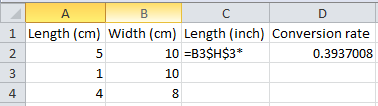
Now we can quickly drag this formula to the other cells.
अब हम इस फ़ॉर्मूले को अन्य सेलो में शीघ्रता से खींच सकते हैं।
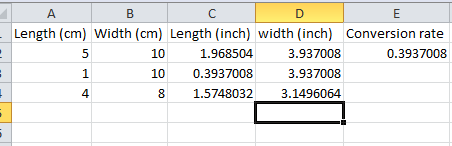
The reference to cell H3 is fixed (when we drag the formula down and across). As a result, the correct lengths and widths in inches are calculated.
सेल H3 का रेफरेंस फिक्स्ड है (जब हम नीचे की ओर फार्मूले को खींचते हैं)। परिणाम स्वरूप, इंच में सही लंबाई और चौड़ाई की गणना की जाती है।
4.16.3 Mixed Cell Reference (मिक्स्ड सेल रेफरेंस)
There can be two types of mixed cell references: मिक्स्ड सेल रेफरेंस दो प्रकार के हो सकते हैं:
- The row is fixed while the column changes when the formula is copied. जब फार्मूले को कॉपी किया जाता है, तो कॉलम में परिवर्तन होने पर रो फिक्स्ड होती है। for example:
= A$3 + A$4If you will drag the above formula into the Right cell then Row address will not be changed but column will be change. (formula isB$3 + B$4) यदि आप उपरोक्त फार्मूले को दाई ओर की सेलों में खींचेंगे तो रो का एड्रेस नहीं बदला जाएगा लेकिन कॉलम बदल जाएगा। (फार्मूलाB$3 + B$4है) - The column is fixed while the row changes when the formula is copied. जब फार्मूले को कॉपी किया जाता है, तो रो में परिवर्तन होने पर कॉलम फिक्स्ड होता है। for example:
= $A3 + $A4If you will drag the above formula into the below cell then Column address will not be changed but Row will be change. (formula is$A4 + $A5). यदि आप उपरोक्त फार्मूले को नीचे की सेल में खींचेंगे तो कॉलम का एड्रेस नहीं बदला जाएगा लेकिन रो बदल जाएगी। (फार्मूला$A4 + $A5है)


